

• Skip to primary navigation
  • Skip to main content
  • Skip to footer
(800) 689-1273
Facebook Twitter Youtube Linkedin
Prospect Genius logo

Prospect Genius

Menu
  • Services
    • Websites
      • CoreSite
      • Free Google Business Profile Website Alternative
    • SEO
      • CleanSlate
      • Directory Dominator
      • SEO Content Writing Services
    • A.I.
      • AI Optimization
      • AI Optimization Quick Start
    • Social Media
      • SocialStart
      • SocialBuzz
      • SocialStream
    • Pay Per Click
      • ChatGPT Ads
      • Google Ads
      • Facebook / Instagram Ads
      • Remarketing
    • Email Marketing
      • EmailStream
      • ReviewStream
    • Tools
      • ReviewTrax
      • Site Optimization Analysis
      • PhoneSwap
      • CallTrax
      • Spaminator
      • EmailMask
      • WebFax
      • AdTrax
      • MapTrax
    • Google Business Profile
      • Google Business Profile Rescue
      • Google Review Rescue
      • Google Business Profile Optimization
      • Google Review StarSaver
  • Reviews
  • FAQ
  • About Us
    • Charity
  • Blog
  • Contact Us
Log In
You are here: Home / Blog / Google Changed the Review Rules. How to Comply Without Disrupting Your Workflow.

Google Changed the Review Rules. How to Comply Without Disrupting Your Workflow.

Last Updated: September 24, 2026

ReviewTrax concept shown in practice with a customer and the tech providing the QR code for her to use

TL;DR

Google updated its rules to prohibit businesses from asking customers to mention employee names or specific content in reviews. This change affects how businesses track who is requesting reviews from customers.

  • Previously, businesses tracked employee review requests by asking customers to name the employee in reviews, which Google now disallows.
  • ReviewTrax offers a compliant solution by assigning each employee a unique QR code to track review requests before the review is even written.
  • This system preserves existing workflows without requiring customers to download apps or create accounts while accurately tracking employee performance.

Quick win: Use ReviewTrax QR codes for tracking reviews instead of asking customers to mention employee names, keeping your review gathering compliant and your workflow simple.

As we mentioned a couple of weeks ago, Google changed the rules for how businesses can ask customers for reviews.

The major change is that businesses can no longer ask customers to mention an employee’s name, or include other specific content, in their review.

What might sound like a small change is actually a big deal for a lot of small businesses because it takes away one of the easiest ways to keep score.

For years, businesses have asked happy customers to mention the employee who helped them. It was simple and almost foolproof. If five reviews mentioned Mike, Mike got credit for five reviews.

That made it easy to see who was actually asking customers for reviews, who kept forgetting, and who deserved recognition for consistently doing it.

Google’s new rule takes that tracking method off the table.

Google took away the easy way to keep score. So we built a better option: ReviewTrax.

download from google play storedownload on the apple app store

How Does ReviewTrax Replace Name-Drop Tracking?

ReviewTrax moves the tracking out of the review itself.

Each employee gets a unique QR code. When a customer scans it, ReviewTrax records whose code was used before the customer ever starts writing the review.

So instead of saying:

“Please leave us a review and mention Mike by name.”

Mike can simply say:

“If you have a minute, we’d really appreciate an honest review.”

The customer scans Mike’s QR code and continues on to leave the review in their own words.

That’s it.

They can mention Mike if they genuinely want to, but they do not need to. ReviewTrax already knows Mike was the employee who asked for the review.

You Don’t Have to Change the Workflow That Was Already Working
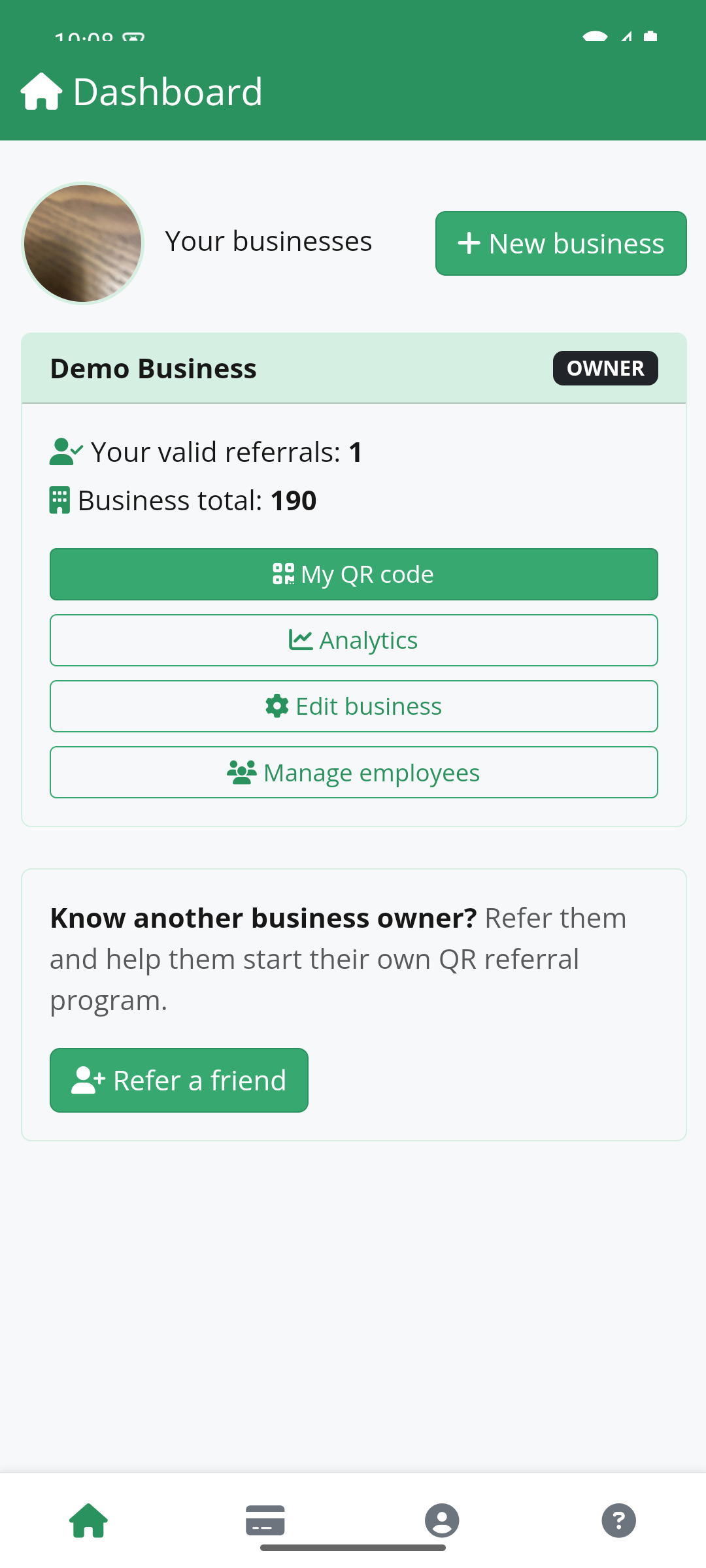
ReviewTrax screenshot showing the dashboardOne of our biggest goals with ReviewTrax was to avoid replacing one simple system with a complicated one.

If your employees already use QR codes to collect reviews, the process barely changes:

  1. The employee finishes the job or customer interaction.
  2. The employee asks the customer for an honest review.
  3. The customer scans that employee’s QR code.
  4. ReviewTrax records the scan.
  5. The customer continues on to leave their review.

ReviewTrax simply sits in the middle and handles the tracking.

The customer does not need to download an app, create an account, or learn a new process.

Now You Can See Who Is Actually Asking for Reviews
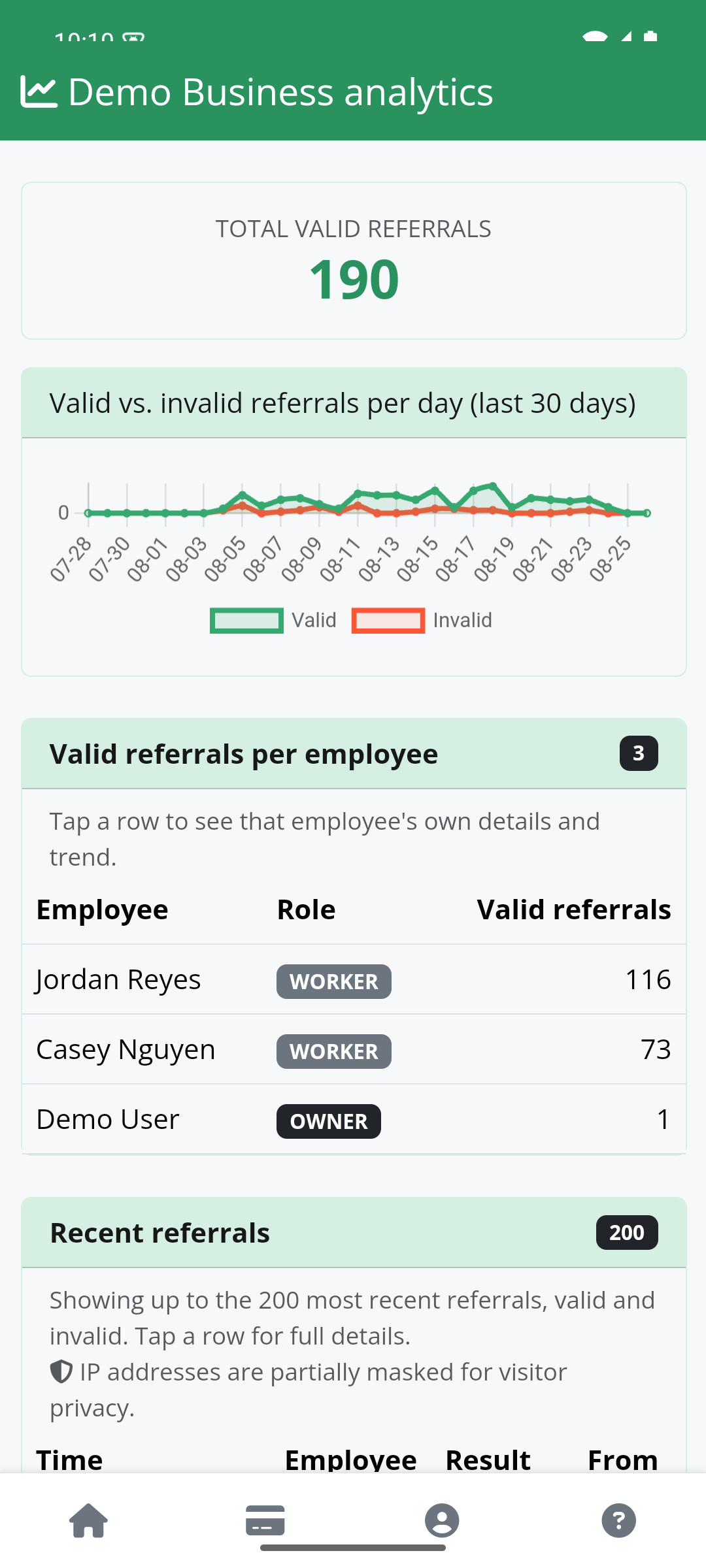
Screenshot of ReviewTrax analytics This is the part that matters to the business owner. You do not have to count names in reviews or keep your own spreadsheet.

Just look at the report. You can see which employees are actually asking customers for reviews and which ones are not.

If Mike is consistently doing it and Steve keeps forgetting, you know. If you want to recognize employees who are making review requests part of their normal routine, you have real numbers to work with.

ReviewTrax does the counting for you.

What Keeps Someone From Gaming the Numbers?

Of course, once employees know their numbers are being tracked, somebody may be tempted to get a little creative.

We thought about that too.

ReviewTrax automatically validates scans rather than blindly counting every hit. QR codes can also be refreshed, so an old code that gets copied or shared cannot simply be reused forever to keep running up the numbers.

You do not need to know every detail of how the fraud protection works. You just need to know that we did not build a scoreboard that assumes everyone will always play fair.

Why Not Just Keep Asking Customers to Mention Employee Names?

Because Google has now specifically told businesses not to do that.

Customers are still free to mention employees on their own. The problem is asking them to include an employee’s identity or other specific content in the review.

Google can take action against review activity that violates its policies, including removing reviews or restricting review posting. If your current system depends on telling customers what to put in their reviews, it makes sense to change it.

ReviewTrax lets you change the tracking without throwing out the rest of the process.

Keep Asking for Reviews. Just Keep Score Differently.
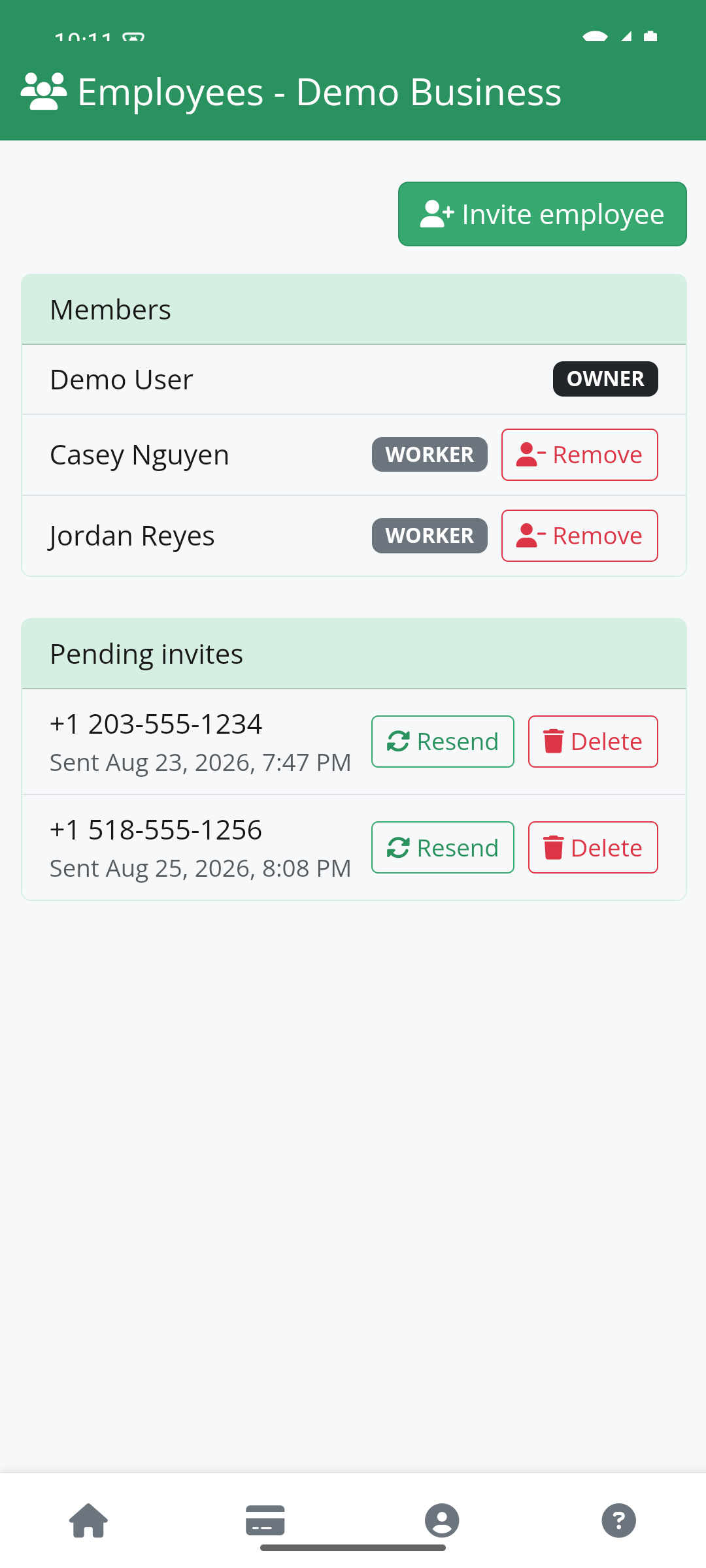
ReviewTrax screenshot showing the employee management pageYou still need your employees asking happy customers for reviews. You still need to know who is actually doing it.

And your employees still deserve credit when they consistently make the effort. ReviewTrax gives you that information without relying on employee names inside Google reviews.

Google changed the rules. You don’t need to rebuild your workflow. You just need a better way to keep score.

download from google play storedownload on the apple app store

ReviewTrax FAQs


Google updated its rules to prohibit businesses from asking customers to mention an employee’s name or include other specific content in their reviews. This change means businesses can no longer request customers to include identifying details about employees in the review text.


ReviewTrax replaces tracking employee reviews by using unique QR codes assigned to each employee. When customers scan an employee’s QR code before leaving a review, ReviewTrax records who requested the review. This eliminates the need for customers to mention employee names in their reviews while still allowing the business to track review requests effectively.


Yes, businesses do not need to change their existing workflow. Employees simply continue asking customers for honest reviews and provide their unique QR code for scanning. ReviewTrax handles the tracking behind the scenes, so customers don’t have to learn new steps or download any apps.


ReviewTrax automatically validates scan activity to reduce false or repeated counts. QR codes can be refreshed regularly so that old codes cannot be copied or shared indefinitely. This system protects the integrity of tracking without relying solely on trust.


Google’s updated policies specifically advise against businesses requesting customers to mention employee names or other specific content in reviews. Violating these rules can lead to actions such as review removal or restrictions on posting new reviews, which may harm the business’s online reputation.


Business owners can view reports generated by ReviewTrax that show which employees’ unique QR codes were scanned. This data reveals who is consistently asking customers for reviews and who may need reminders, providing accurate tracking without relying on names mentioned in the reviews themselves.

About the author...
Photo of Alex Pelli
Alex Pelli

Alex is the Founder and President of Prospect Genius, helping small businesses across the U.S. and Canada grow through SEO, paid search, and AI-driven marketing strategies since 2008. With more than 20 years in digital marketing, he specializes in adapting enterprise-level search and AI visibility techniques into customized, practical systems for local service businesses.

Author's Full Bio

Related Posts

What Do a Toothache and Review Collection Have in Common?

What Do a Toothache and Review Collection Have in Common? They both nag at you, interrupt your day, and never seem to fully go away. So yes, they're basically the same thing. You do the work. You answer the phone, schedule the job, show up on time, solve the problem, deal with the invoice, and move…

Did Google Really Ban Employee Names in Reviews?

Have you heard that Google has banned customers from mentioning employee names in reviews? That claim has been making the rounds in local SEO circles since Google updated its review policies a few months ago. There is just one problem. That is not quite what Google said. Customers are not suddenly f…

Tweak Your Ask, Get More Useful Reviews

For years, local businesses were told to focus on review count, star rating, and how recently new reviews were posted. Those signals still matter. But AI-powered search can now do more with the actual words customers use. A five-star rating says a customer was happy. A review that says, "They arrive…

Prospect Genius logo

Contact Us

Prospect Genius
279 Troy Rd
Ste 9 #102
Rensselaer, NY 12144

Business Hours

Mon – Fri: 9am – 6pm ET

(800) 689-1273
hello@prospectgenius.com

Let’s Connect!

Facebook Twitter Youtube Linkedin

What Drives Us?

Our passion is helping small businesses thrive. It’s why we get out of bed every day. Too many business owners are cheated and lied to every day so we see it as our duty to be a beacon of truth, a safe harbor, in an often unscrupulous industry.

Client Portal App


Helpful Links

  • Case Studies
    • AI Optimization for Small Businesses
    • Geo-Targeted Web Content Quadruples Lead Volume
    • Negative Review Attack
    • Resiliency of SEO Strategies
    • Facebook Ads for Growth
    • Google PPC Ads Double Calls
    • Facebook Ads vs Google Ads
    • SEO Brings Online Success
    • GBP Optimization
    • Prospect Genius > Home Advisor
    • CleanSlate Creates NAP Win
  • Professional Answering Services
  • Integrity Pledge
  • Porting a CallTrax Phone Number
  • Frequently Asked Questions
  • About
  • FAQ
  • Contact
  • Privacy Policy

Sign up for our newsletter!

Join our mailing list and receive regular updates on how to effectively market your small business, along with exclusive service promotions.
Please enable JavaScript in your browser to complete this form.
Suspended Map Listing?

Appealing a GBP Suspension can be tricky and time-consuming. Don’t risk wasting weeks on repeated failed attempts, all while your listing remains down. We will get it back quickly!

Google Business Profile Rescue

Tired of wrestling with Meta Ads?

The platform is confusing, the billing can be frustrating, and keeping ads optimized takes real attention. Let us take it off your plate.

Learn More!

Optimize your site for A.I.

Our AI Quick Start package will get your site ready to compete in the age of A.I. This foundational package is a low-cost, high-reward option to help you get cited by AI agents.
Get the AI Quick Start now!