
Know Which Team Members Are Actually Asking For Reviews
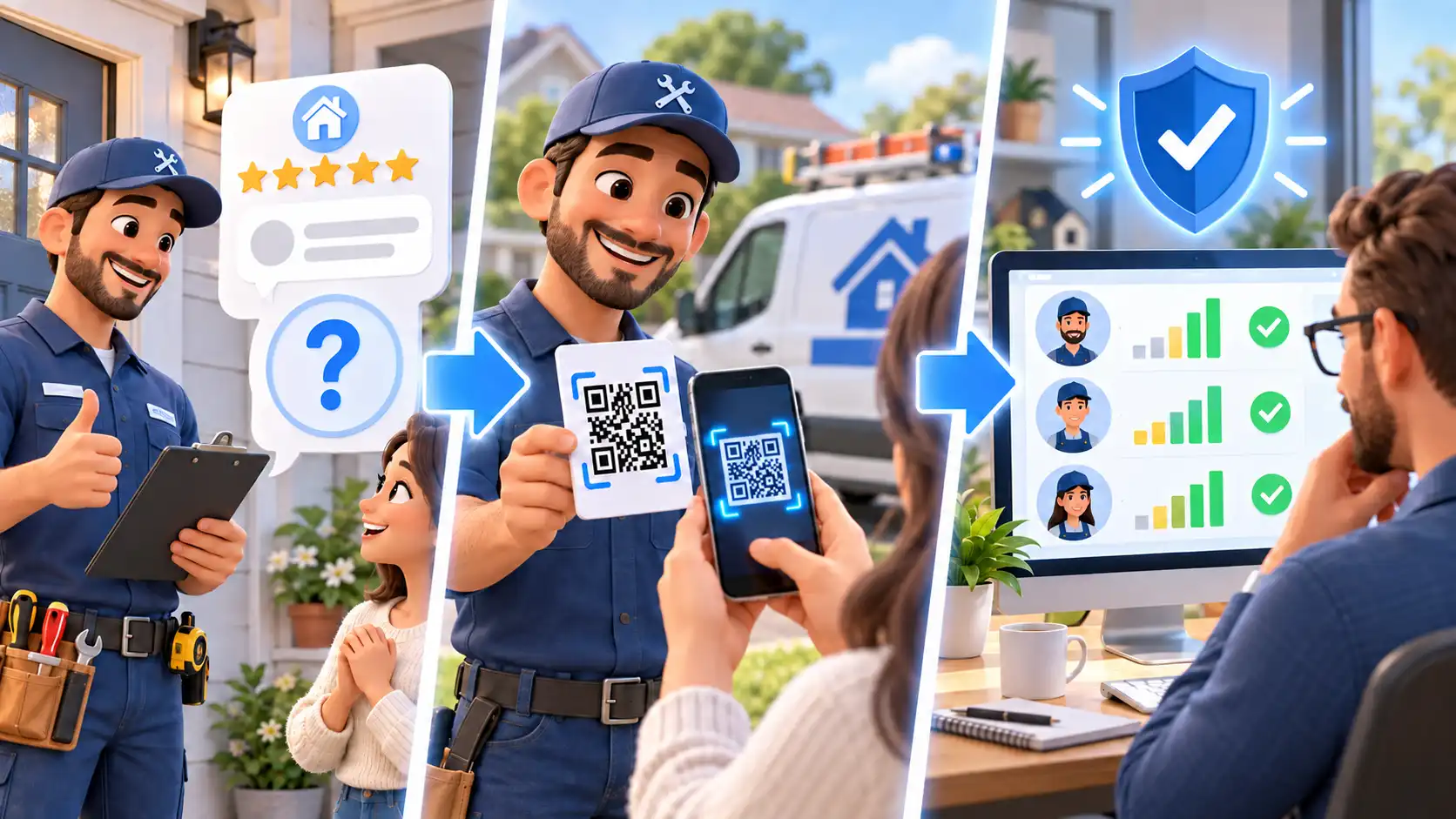
Google changed the rules around how businesses can ask customers for reviews. Businesses are no longer allowed to ask customers to mention an employee by name, or include other specific content, in their review. In other words, if you’ve been using employee name-drops to keep track of who is contributing to the team’s review-gathering efforts, you’ve got an issue on your hands.
But now, ReviewTrax helps you keep your workflow, but stay within Google’s new rules. No name-drop required, and no disruption to your existing workflow.


How Does ReviewTrax Work?
It is intentionally simple.
- Your team members show a QR code to the customer
- The customer uses that QR code to go right to your Google profile (just like you’re doing now)
- ReviewTrax sits silently in the middle, keeping track of each scan.
That’s it. Instead of trying to identify the employee by reading what the customer wrote afterward, ReviewTrax identifies whose QR code started the interaction.
The QR code becomes the tracking mechanism instead of the employee’s name inside the review. This allows you to stay withing the rules, but still use the same process you’re used to.
Who Is ReviewTrax For?
ReviewTrax is built for businesses where multiple team members are responsible for asking customers for Google reviews.
If you have technicians, salespeople, installers, service professionals, or other employees interacting with customers and requesting reviews, ReviewTrax gives you a simple way to see whether that process is actually happening and whose QR code is being used.
What Does ReviewTrax Actually Track?
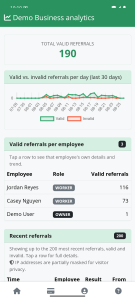 ReviewTrax tracks the use of each employee’s QR code. That distinction matters.
Not every QR-code scan will become a completed Google review. Customers are less predictable than that. What ReviewTrax tells you is whether your team members are putting in the effort to collect the reviews. review-request process is actually being used and whose code was used to start each tracked interaction.
So instead of wondering whether Mike, Steve, and Tom are actually using the process, you can look at the report. No counting names by hand. No spreadsheet.
Can’t Users Just Game The System?
We built in fraud-protection measures to prevent this exact issue. We look at the timing and sources of the reviews to make sure it’s very very difficult to pad the numbers. We do quite a bit behind the scenes to make sure everything stays on the up and up.
What Do I Have to Set Up?
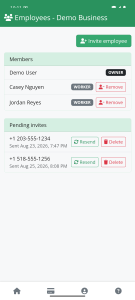 It’s so easy. Just invite each team member to ReviewTrax by inputting their name and phone number. That’s it. They’ll then have access to their own QR code right in the app.
Login is passwordless, so you also avoid creating one more password for everybody to forget.
When an employee needs the QR code, they pull it up and show it to the customer. ReviewTrax instantly generates a fresh new QR code on the spot. If your team already uses QR codes to request reviews, the process should feel immediately familiar.
With ReviewTrax, Very Little Changes.
Your employees keep asking customers for reviews. Your customer still just scans a QR code.
The only difference is you can stop counting reviews because ReviewTrax will spit out a simple report each month.
That’s it.
You get a simple way to see whether your review-request process is actually being used without depending on policy-violating employee name-drops inside Google reviews.